Recipes
What happens when you press a source, with the source left as a blank slot. Build it once, and it works on any input.
Built for our own shows. Ready for yours.

Free Mac app
Lay out your Bitfocus Companion pages on a picture of your Stream Deck, then send them straight to Companion.
See detailsClose
Free Mac app, in beta
Design the background behind your ATEM SuperSource boxes, and get Companion smart buttons that run the whole look.
See detailsClose
Free Mac app
A Stream Deck on your screen. Any model, or a custom grid, as a surface in Companion.
See detailsClose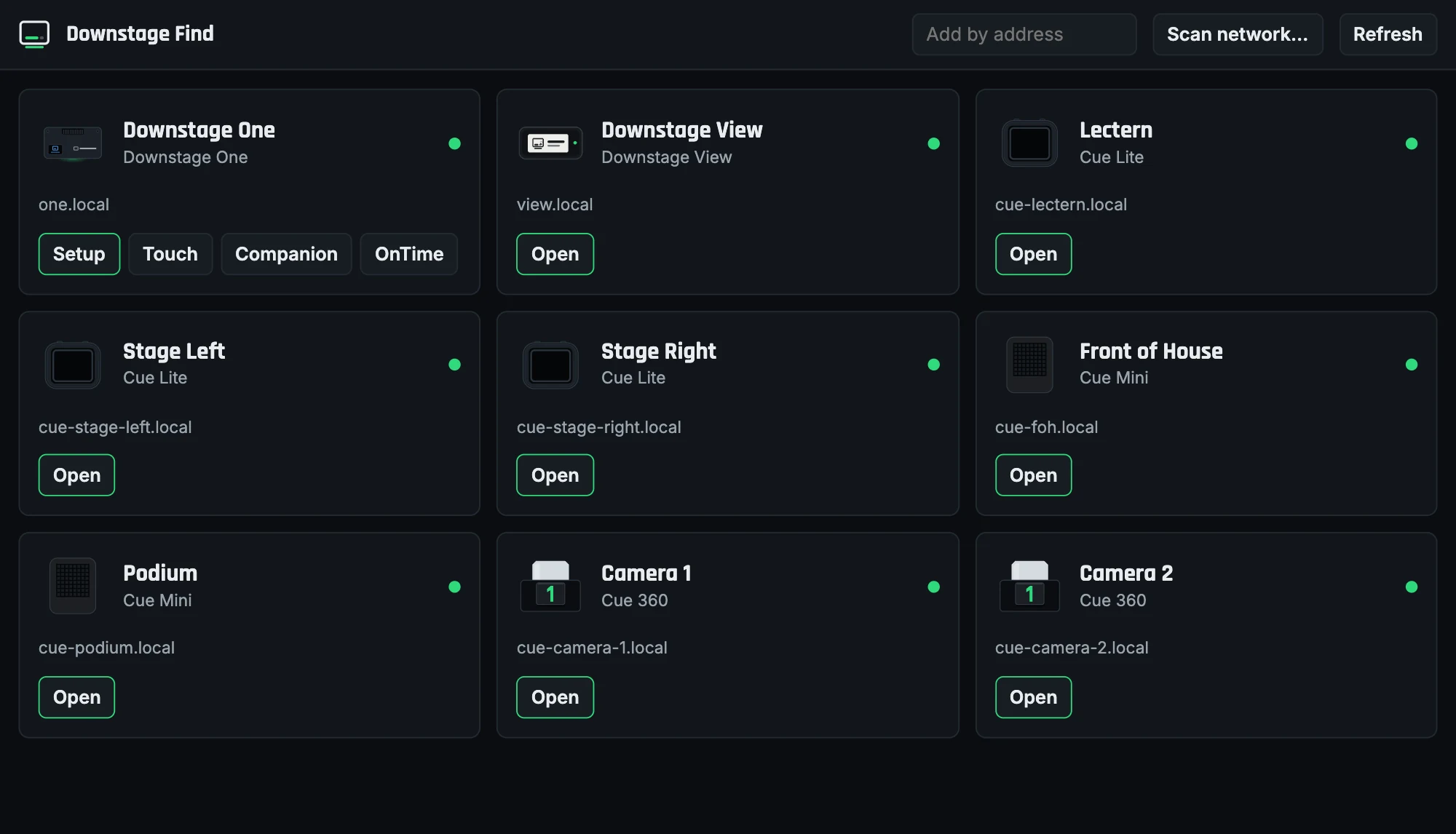
Free Mac app
Finds the Downstage devices on your network and opens their apps.
See detailsClose
Lay out your Bitfocus Companion pages on a picture of your Stream Deck, then send them straight to Companion. A free Mac app.
Free. Apple Silicon Macs. Needs Bitfocus Companion.
"As a Blackmagic ATEM user, I got tired of rebuilding the same multi-step, feedback-driven buttons every time a show's sources changed."Rob Spradling, Downstage Systems
It doesn't replace Companion. That's still where you set up connections and fine-tune actions and feedbacks. Show Builder handles the repetitive part.
What happens when you press a source, with the source left as a blank slot. Build it once, and it works on any input.
Send a page directly onto a Companion page, with no fiddling in the import and export screen. Or export a page file.
Hold Option, click keys in the order they should run, and let go. They become one multi-step key.
Keep every deck and page for a gig in one file. Next gig, open it, change what's different and send it again.
Flying keys, T-bar dials, SuperSource boxes, tally keys, combo keys and live status like on-air and stream time, plus a wizard for building new ones. The Connections tab brings in the presets from the rest of your gear.
Lay out several Stream Decks in one window, and a Home page builds its own navigation. Works with the + XL, +, XL, 15 key, Neo and Mini, or a custom grid.
Open the disk image and drag it to Applications.
Type your Companion's address in the header. Your switcher's source names appear.
Pick a recipe, click a source, click a key. Then choose Send to Companion and Build page.
Built around the ATEM so far, with more on the way.
On GitHub. Posting takes a free account.
Design the background behind your ATEM SuperSource boxes in your client's colors, and get Companion smart buttons that run the whole look.
Free, in beta: test on a switcher that isn't in a show first. Apple Silicon Macs.
One button per look. Press it and it works out the move from wherever you are, so there's no list of macros to keep track of. Send the page straight to Companion, or import a file.
Brand colors from a logo, patterns, text, title bars, frames and overlays, with 1 to 4 boxes. Every move is written for you as eased macros.
Start from a whole look instead of a blank background. Your brand carries across every one, and each part stays on its own layer to change.
A button lights up when its look is on air and turns amber while a move runs, ignoring presses until it lands. Full-screen buttons name whatever is in that box.
Press a look while a camera is live and it hands in: SuperSource takes that shot full screen, cuts to itself where nobody can see it, then moves.
For the ATEM Mini Extreme ISO, 2 M/E and 4 M/E. Smart buttons need Bitfocus Companion.
On GitHub. Posting takes a free account.
A Stream Deck on your screen. Pick any model, from the Mini to the + XL, or a custom grid, and it joins Bitfocus Companion as a surface. Put several decks on one canvas, lock them in place, and save the layout as a show.
Free. Apple Silicon Macs. Needs Bitfocus Companion 4.0 or later.
Mini, Neo, 15 key, XL, + or + XL, picked from one menu.
Set the columns and rows you need, and Companion fills them.
Click a key on screen and Companion runs it like a hardware press.
The + models have working dials, and the strip shows what each one is set to.
It joins Companion like hardware, and you choose its page under Surfaces.
On GitHub. Posting takes a free account.
Finds the Downstage devices on your network and opens their apps. Each Cue light shows green when it is live on Companion, or says why it needs a look, and Identify blinks it so you know which one is which. Add one by its address if a network hides them.
Free. Apple Silicon Macs.
On GitHub. Posting takes a free account.
Leave your email and we will tell you about new apps and updates.
Only about Downstage. Unsubscribe any time.